
In this chapter, we will tackle an interesting and classic system design interview question: designing a URL shortening service like TinyURL.
Step 1 — Understand the Problem & Design Scope
System design interview questions are intentionally open-ended. To design a well-crafted system, it is critical to ask clarification questions.
Candidate: Can you give an example of how a URL shortener works?
Interviewer: Assume URL
https://www.systeminterview.com/q=chatsystem&c=loggedin&v=v3&l=long is the
original URL. Your service creates a shorter alias: https://tinyurl.com/y7keocwj.
Clicking the alias redirects to the original URL.
Candidate: What is the traffic volume?
Interviewer: 100 million URLs are generated per day.
Candidate: How long is the shortened URL?
Interviewer: As short as possible.
Candidate: What characters are allowed?
Interviewer: A combination of numbers (0-9) and characters (a-z, A-Z).
Candidate: Can shortened URLs be deleted or updated?
Interviewer: For simplicity, assume they cannot.
Basic Use Cases
- URL shortening: given a long URL ⟹ return a much shorter URL
- URL redirecting: given a short URL ⟹ redirect to the original URL
- High availability, scalability, and fault tolerance
Back-of-the-Envelope Estimation
- Write operations: 100 million URLs/day
- Write ops/second: 100M / 24 / 3600 ≈ 1,160 / s
- Read ops/second: 10:1 read-write ratio → 11,600 / s
- 10-year storage: 100M × 365 × 10 = 365 billion records
- Storage size: 365B × 100 bytes avg URL = 36.5 TB
It is important to walk through these assumptions with your interviewer so that both of you are on the same page.
Step 2 — Propose High-Level Design & Get Buy-In
In this section we discuss the API endpoints, URL redirecting, and URL shortening flows.
API Endpoints
We will design REST-style APIs. A URL shortener primarily needs two endpoints:
-
URL shortening. A client sends a POST request with the original long URL:
POST api/v1/data/shorten - request body: { longUrl: string } - response: shortURL -
URL redirecting. A client sends a GET request for the short URL:
GET api/v1/:shortUrl

- response: 301/302 redirect → longURL
URL Redirecting
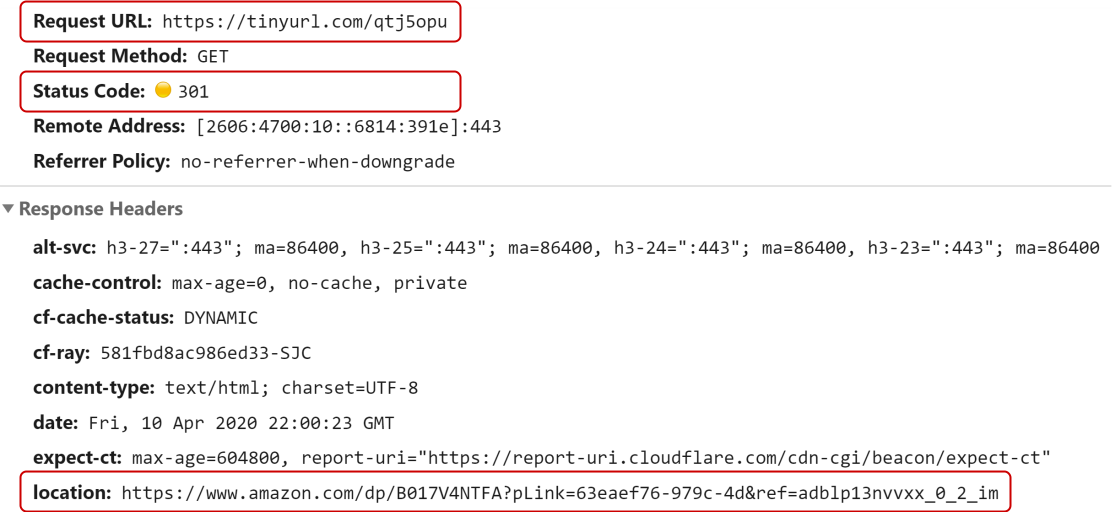
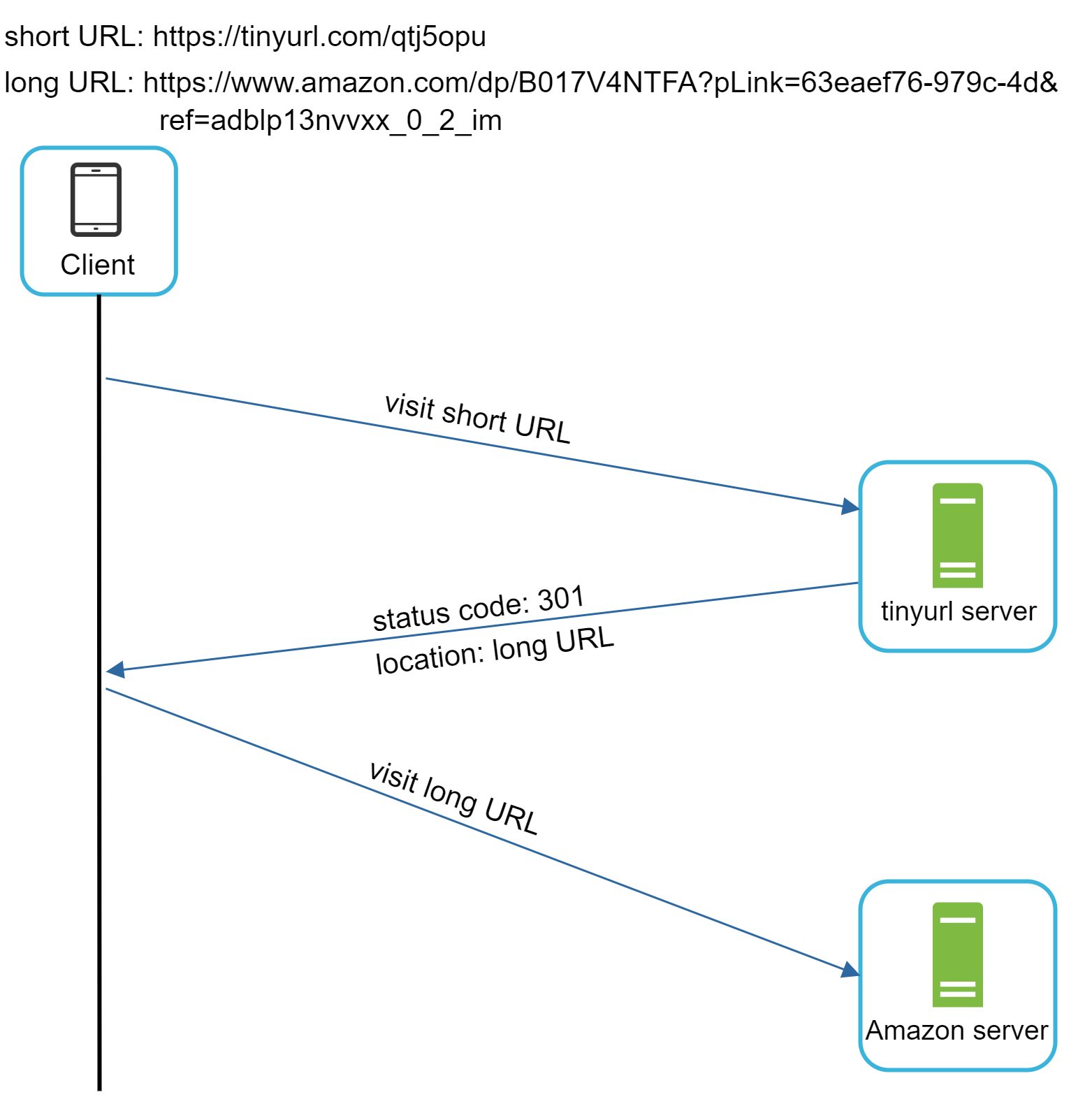
Figure 1 shows what happens when you enter a TinyURL in the browser. Once the server receives the request, it changes the short URL to the long URL with a redirect.
301 vs 302 Redirect
301 redirect signals that the URL is permanently moved. The browser caches this response, so subsequent requests bypass the URL shortener and go directly to the destination. This reduces server load.
302 redirect signals a temporary move. Every request goes through the URL shortener first, allowing accurate click analytics.
If reducing server load is the priority, use 301. If analytics matter, use 302.
The simplest implementation uses a hash table storing <shortURL, longURL> pairs. To
redirect:
- Lookup:
longURL = hashTable.get(shortURL) - Perform the HTTP redirect to
longURL
URL Shortening
Assume the short URL looks like www.tinyurl.com/{hashValue}. We need a hash function
f(x) that maps a long URL to a hash value, as shown in Figure 3.

The hash function must satisfy:
- Each longURL maps to exactly one hashValue
- Each hashValue maps back to exactly one longURL
Step 3 — Design Deep Dive
We dive deep into: data model, hash function, URL shortening flow, and URL redirecting flow.
Data Model
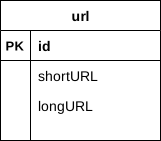
While a hash table is a good starting point, it is not feasible at scale due to limited and expensive
memory. A better approach is to store <shortURL, longURL> mappings in a relational
database.
Hash Function
The hash function converts a long URL into a short URL (the hashValue).
Hash Value Length
The hashValue uses characters from [0-9, a-z, A-Z] — 62 possible characters. We
need the smallest n such that 62ⁿ ≥ 365 billion.
| n | Maximal number of URLs |
|---|---|
| 1 | 62 |
| 2 | 3,844 |
| 3 | 238,328 |
| 4 | 14,776,336 |
| 5 | 916,132,832 |
| 6 | 56,800,235,584 |
| 7 | ~3.5 trillion ✓ |
| 8 | 218,340,105,584,896 |
Table 1 — hashValue length vs. URL capacity (n=7 is sufficient for 365 billion URLs)
When n = 7, 62⁷ ≈ 3.5 trillion — more than enough to hold 365 billion URLs. So the hashValue length is 7.
We will explore two types of hash functions: (1) hash + collision resolution, and (2) base 62 conversion.
Hash + Collision Resolution
Use well-known hash functions like CRC32, MD5, or SHA-1. Here are results for
https://en.wikipedia.org/wiki/Systems_design:
| Hash function | Hash value (Hexadecimal) |
|---|---|
| CRC32 | 5cb54054 |
| MD5 | 5a62509a84df9ee03fe1230b9df8b84e |
| SHA-1 | 0eeae7916c06853901d9ccbefbfcaf4de57ed85b |
Table 2 — Hash function outputs (all exceed 7 characters)
Even the shortest (CRC32) exceeds 7 characters. The approach: collect the first 7 characters; if a collision exists, recursively append a predefined string and rehash until unique. See Figure 5.

This eliminates collisions but is expensive (DB query per request). A bloom filter can dramatically improve performance — it's a space-efficient probabilistic data structure to test set membership.
Base 62 Conversion
Base 62 uses 62 characters for encoding. Mappings:
0→0, …, 9→9, 10→a, …, 35→z, 36→A, …, 61→Z.
Example: convert 11157₁₀ to base 62:
- 11157 = 2×62² + 55×62¹ + 59×62⁰ = [2, T, X]
- Short URL:
https://tinyurl.com/2TX

Comparison of the Two Approaches
| Hash + Collision Resolution | Base 62 Conversion |
|---|---|
| Fixed short URL length | URL length grows with ID |
| No unique ID generator needed | Requires a unique ID generator |
| Collisions possible; must resolve | No collisions — ID is unique |
| Next available URL is unpredictable (secure) | Next URL is predictable (security concern) |
Table 3 — Hash + Collision Resolution vs Base 62 Conversion
URL Shortening Deep Dive
We use base 62 conversion in our design. Figure 7 demonstrates the full shortening flow.

- Input: the longURL is received.
- DB check: does the longURL already exist?
- If yes: fetch and return the existing shortURL.
- If no: generate a new unique ID (primary key) via the distributed ID generator.
- Convert the ID to a shortURL using base 62 conversion.
- Save
(id, shortURL, longURL)to the database.
Concrete example:
| id | shortURL | longURL |
|---|---|---|
2009215674938 |
zn9edcu |
https://en.wikipedia.org/wiki/Systems_design |
Table 4 — Example database entry
The distributed unique ID generator is central to this approach. Its primary function is generating globally unique IDs used to create shortURLs. See the "Design A Unique ID Generator in Distributed Systems" chapter for implementation details.
URL Redirecting Deep Dive
Figure 8 shows the detailed URL redirecting design. Since reads vastly outnumber writes,
<shortURL, longURL> mappings are cached to improve performance.
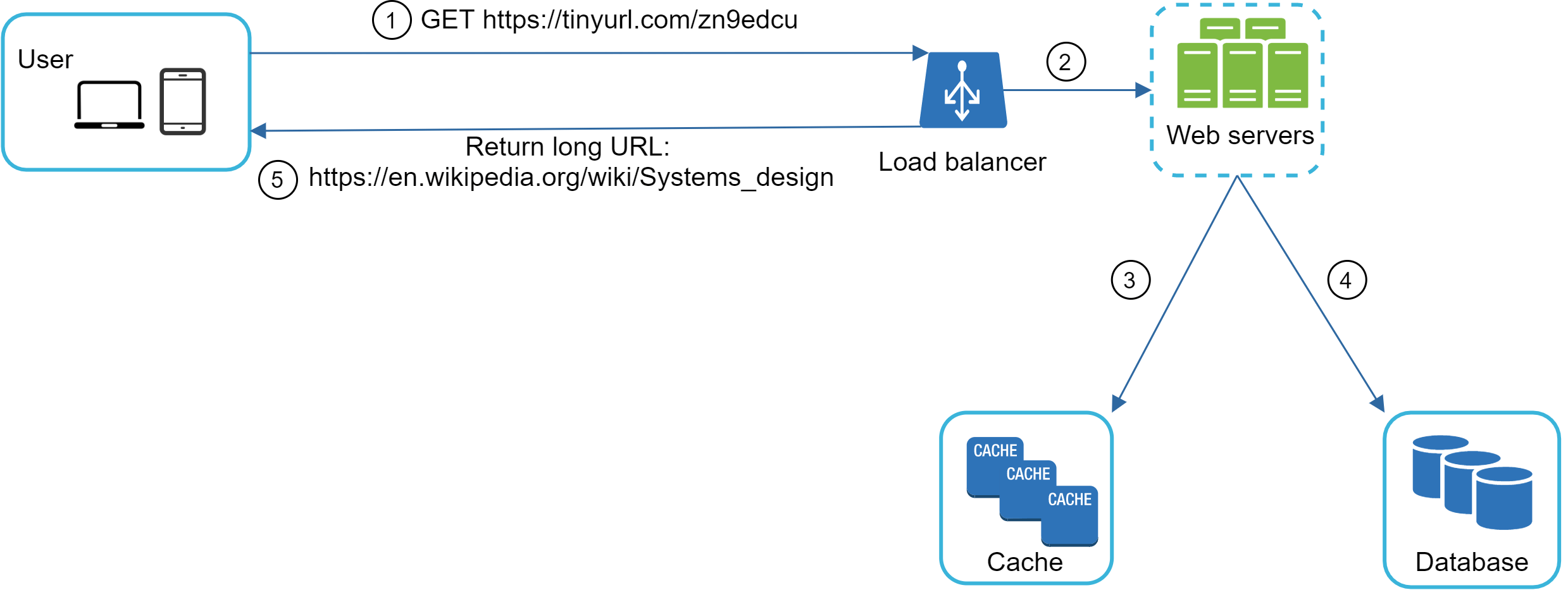
The redirect flow:
- User clicks:
https://tinyurl.com/zn9edcu - Load balancer forwards the request to web servers.
- Cache hit? Return the longURL immediately.
- Cache miss? Fetch the longURL from the database (invalid shortURL → 404).
- Return the longURL to the user via HTTP redirect.
Step 4 — Wrap Up
We covered: API design, data model, hash function, URL shortening, and URL redirecting. Additional talking points for extra interview time:
- Rate Limiter: Protects against malicious users sending mass shortening requests. Filter by IP address or other rules.
- Web Server Scaling: The web tier is stateless — easily scale by adding or removing servers.
- Database Scaling: Use replication and sharding for the database tier.
- Analytics: Integrate an analytics solution to track clicks, sources, and timing data.
- Availability, Consistency & Reliability: Core concepts for any large-scale system — covered in the "Scale From Zero To Millions Of Users" chapter.
🎉 Congratulations on getting this far! Give yourself a pat on the back. Good job!
Reference Materials
[1] A RESTful Tutorial: https://www.restapitutorial.com/index.html
[2] Bloom filter: https://en.wikipedia.org/wiki/Bloom_filter